


Consent Status
Section titled “Consent Status”You can check the current consent status:
SecurePrivacyMobileConsent.getConsentStatus('YOUR_APPLICATION_ID');SPConsentStatus values
Section titled “SPConsentStatus values”| Constant | Meaning |
|---|---|
PENDING |
Consent needs to be collected. |
COLLECTED |
Consent has already been obtained. |
RECOLLECTION_REQUIRED |
Consent needs to be re-collected. |
Consent Recollection Reason
Section titled “Consent Recollection Reason”When the SDK determines that consent needs to be recollected (for example, a consent update/re-consent flow), you can fetch the reason by calling:
const result = await SecurePrivacyMobileConsent.getConsentRecollectionReason('YOUR_APPLICATION_ID');const reason = result.data;
if (reason) {  switch (reason) {    case SPConsentRecollectionReason.EXPIRED:      // Handle EXPIRED      break;    case SPConsentRecollectionReason.STRUCTURE_CHANGED:      // Handle STRUCTURE_CHANGED      break;  }}
If no recollection reason is available, reason will be null.
SPConsentRecollectionReason values
Section titled “SPConsentRecollectionReason values”| Constant | Meaning |
|---|---|
EXPIRED |
Consent has expired and needs to be re-collected. |
STRUCTURE_CHANGED |
Packages and services hash mismatch. |
Enum usage guidance
Section titled “Enum usage guidance”SDK constants are the authoritative representation for consent status and recollection reasons. The SDK guarantees the constants contract (what values are possible), but does not guarantee that the underlying wire/raw string values are stable over time (they are serialization details and may change).
Strongly prefer constants e.g. SPConsentStatus or SPConsentRecollectionReason in app logic.
- Use constants in control flow:
switch (status) { ... }orswitch (reason) { ... }. - Avoid branching on raw keys such as
"expired","Collected", or"RecollectionRequired". - If you need your own string identifiers, define app-specific keys and create a custom mapping, for example:
const myReasonKey: string | null = reason === SPConsentRecollectionReason.EXPIRED ? 'MY_EXPIRED' : reason === SPConsentRecollectionReason.STRUCTURE_CHANGED ? 'MY_STRUCTURE_CHANGED' : null;This guidance applies to all constant fields returned from SDK APIs.
Check if User has Enabled the Package
Section titled “Check if User has Enabled the Package”To check if a specific package has been marked as enabled by the user upon giving consent, you can call:
const pkgResult = await SecurePrivacyMobileConsent.getPackage('YOUR_APPLICATION_ID, 'react-native-package-example');
if (pkgResult.data?.enabled ?? false) {  // Enable features}
This would return a SPDataMessage containing the SPMobilePackage only if the user has consented.
Collecting Consent
Section titled “Collecting Consent”To launch the consent collection popup, use the following method:
SecurePrivacyMobileConsent.showConsentBanner();This popup will inform users about the SDK and provides them with options to agree to all, deny to all or customise their consent preferences.
Additionally, you can call the following method to display the secondary consent banner:
SecurePrivacyMobileConsent.showSecondaryBanner()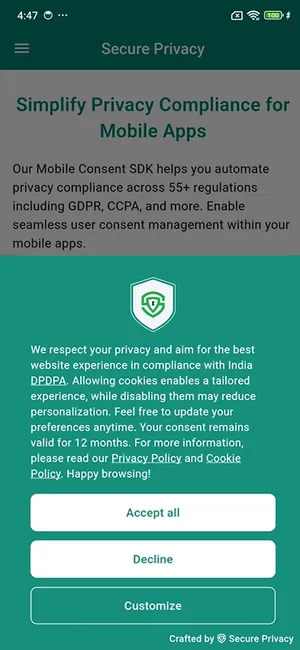
Customization Options
Section titled “Customization Options”The consent banner supports customization options and displays a “Customize” button that allows users to adjust their consent preferences. When they click the customization button, they will be directed to the Preference Center, where they can:
- View a list of frameworks and their services.
- Enable or disable consent for specific services.
To display the Preference Center directly, simply call:
SecurePrivacyMobileConsent.showPreferenceCenter('YOUR_APPLICATION_ID');Essential Services
Section titled “Essential Services”You can mark certain services as essential. These services will not be optional for the user to deny, ensuring compliance with the app’s required functionalities.
Privacy and Cookie Policy
Section titled “Privacy and Cookie Policy”The Preferences screen also includes tabs showcasing content related to the app’s privacy and cookie policies. This ensures users have access to essential information regarding their data handling.
Data Requests
Section titled “Data Requests”Users can submit a request for their data by filling out a form in the Request Data section. This feature helps manage user data requests in compliance with privacy regulations.