


Salesforce API v67.0 (Summer ’26) · Node.js 22 · TypeScript
The API calls are trivial. The real work is identity resolution — Secure Privacy knows a browser, Salesforce knows a person, and only CustomUserId connects them. Section 5 is the one to read closely.
The sync in one page
Section titled “The sync in one page”A scheduled job, one pass per run:
- Read every consent whose
LastUpdatedfalls in a fixed window — section 4. - Resolve each one to a Salesforce
Individual, or set it aside — section 5. - Write one
ContactPointTypeConsentrow per consented category — section 6. - Advance the watermark, but only if the whole pass succeeded.
// The whole program. Everything else in this guide is one of these four// steps in detail.
async function runSync(): Promise<void> {  const from = await readWatermark();          // ISO string, persisted  const to   = new Date().toISOString();       // fixed end -- see section 4
  const consents = await fetchWindow(from, to);            // 1. read
  const stats = { written: 0, anonymous: 0, unresolved: 0, failed: 0 };
  for (const consent of consents) {    try {      const individualId = await resolveIndividualId(consent);   // 2. resolve
      if (individualId === SKIP_ANONYMOUS) { stats.anonymous++;  continue; }      if (individualId === null)           { stats.unresolved++; continue; }
      await applyConsent(consent, individualId);             // 3. write      stats.written++;    } catch (error) {      // One bad record must not abandon the rest of the window. It stays      // unwritten, and the failure count below stops the watermark moving      // past it.      stats.failed++;      logger.error({ consentId: consent.ConsentId, error }, 'consent failed');    }  }
  // 4. Only advance on a clean pass. Moving the watermark past records that  // failed means they are never retried and the gap is invisible.  if (stats.failed === 0) {    await writeWatermark(to);  } else {    logger.warn({ stats }, 'watermark held back; window will be re-read');  }
  logger.info({ stats }, 'sync complete');}
Re-reading a window is safe: writes are keyed so a repeat updates the existing row rather than adding a second one. That is what makes holding the watermark back the right response to a failure.
Run it from your platform’s scheduler — ECS Scheduled Task, Kubernetes CronJob with concurrencyPolicy: Forbid, or similar. Not an in-process timer: two replicas each running their own would process every window twice.
1. Salesforce setup
Section titled “1. Salesforce setup”Enable the consent model. Setup → Data Protection and Privacy → Make data protection details available in records. This exposes the standard consent objects and adds an Individual lookup to Contact, Lead, User and Person Account.
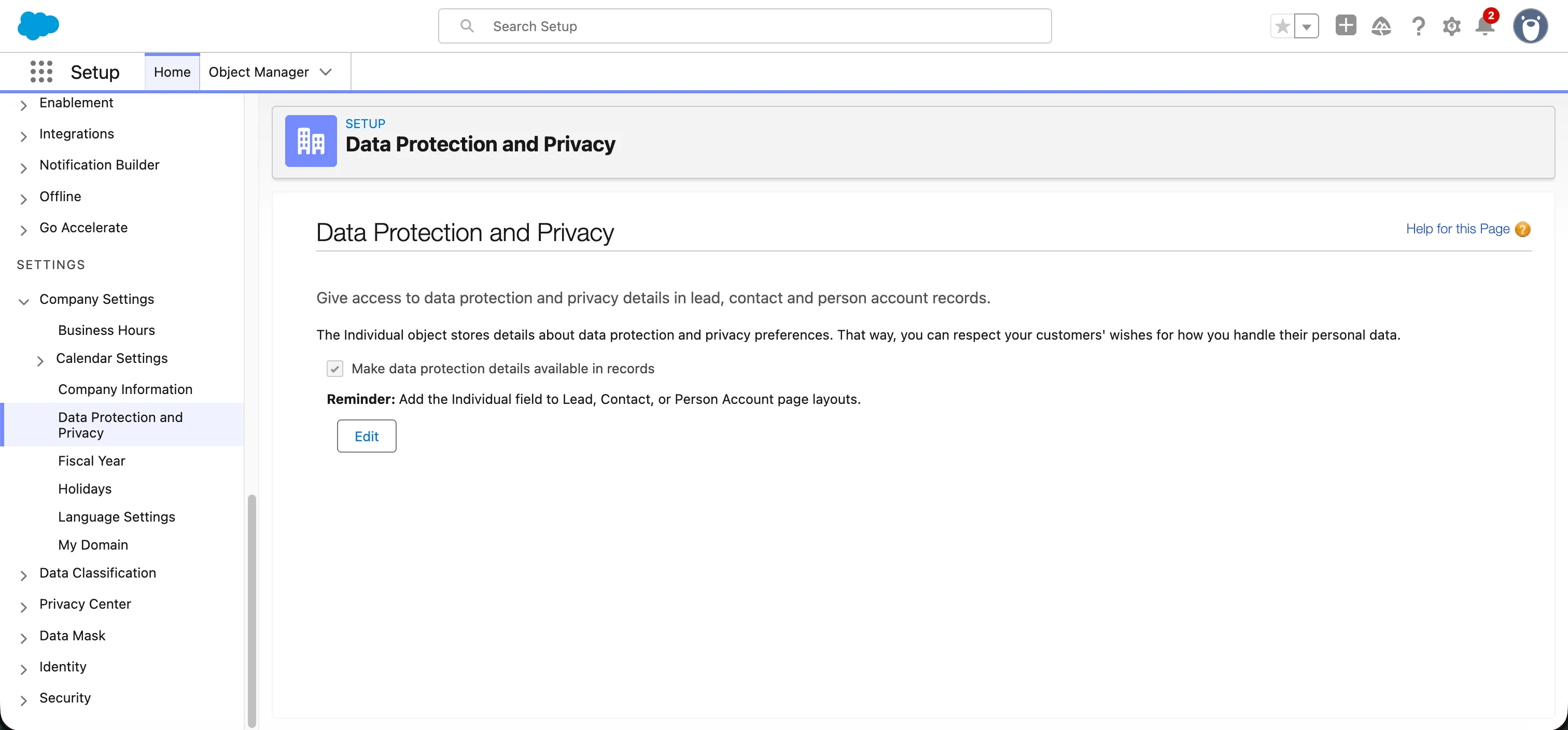
Use this rather than custom checkboxes. A checkbox cannot distinguish “declined” from “never asked,” and consent belongs to a person, not to a Contact record. Consent objects also don’t count against data storage.
Note the reminder on that screen: add the Individual field to your Lead, Contact and Person Account page layouts. The lookup exists via the API without it, but admins cannot see or set it in the UI, which makes the matching described in 5. Matching consents to people impossible to verify by hand.
You’ll write to:
| Object | Holds |
|---|---|
Individual |
The person. Anchor record and join key. |
DataUseLegalBasis |
The lawful basis — Consent, Legitimate Interest, etc. |
DataUsePurpose |
Why you are processing — Marketing, Analytics, etc. One per purpose. |
ContactPointTypeConsent |
The decision, per category per person. |
Legal basis and purposes
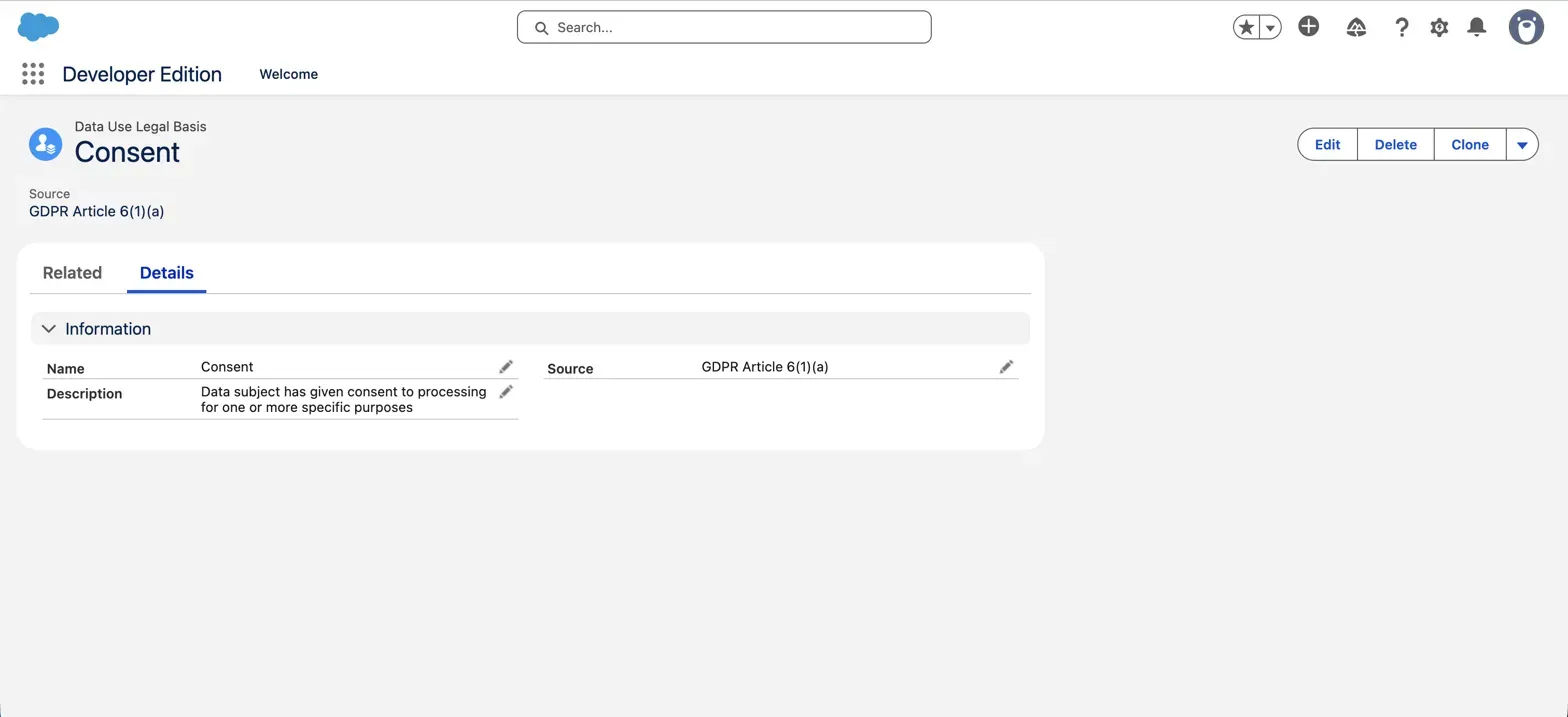
Section titled “Legal basis and purposes”Create the legal basis records first: DataUsePurpose.LegalBasisId is a lookup to DataUseLegalBasis, not a picklist, so the referenced record has to exist before a purpose can point at it. Record the statutory reference in Source — it costs nothing and answers the obvious audit question.
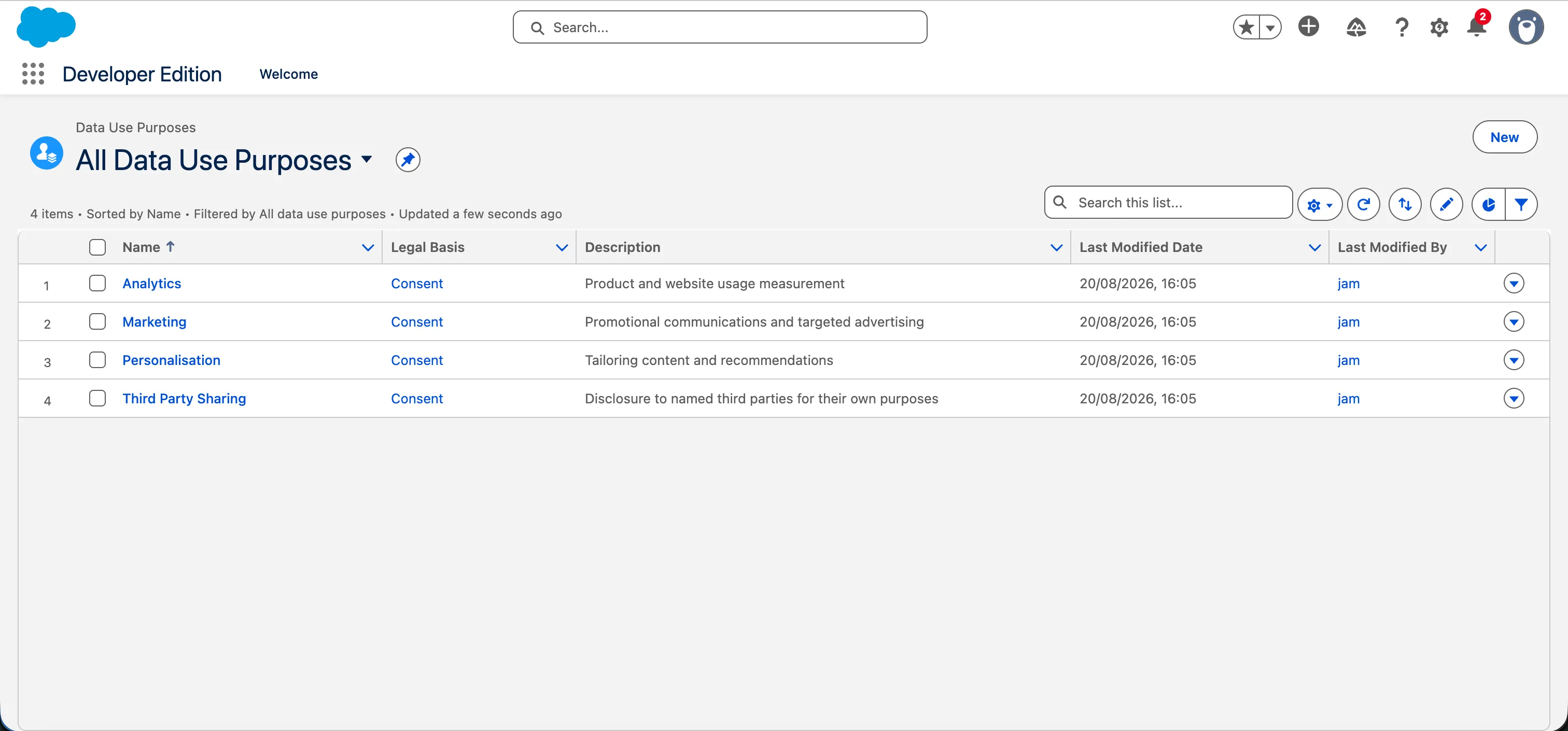
Then create one DataUsePurpose per purpose you intend to sync, each pointing at that legal basis. Set CanDataSubjectOptOut to reflect whether opt-out is actually available — true for consent-based purposes, potentially false for a legitimate-interest one.
Custom fields
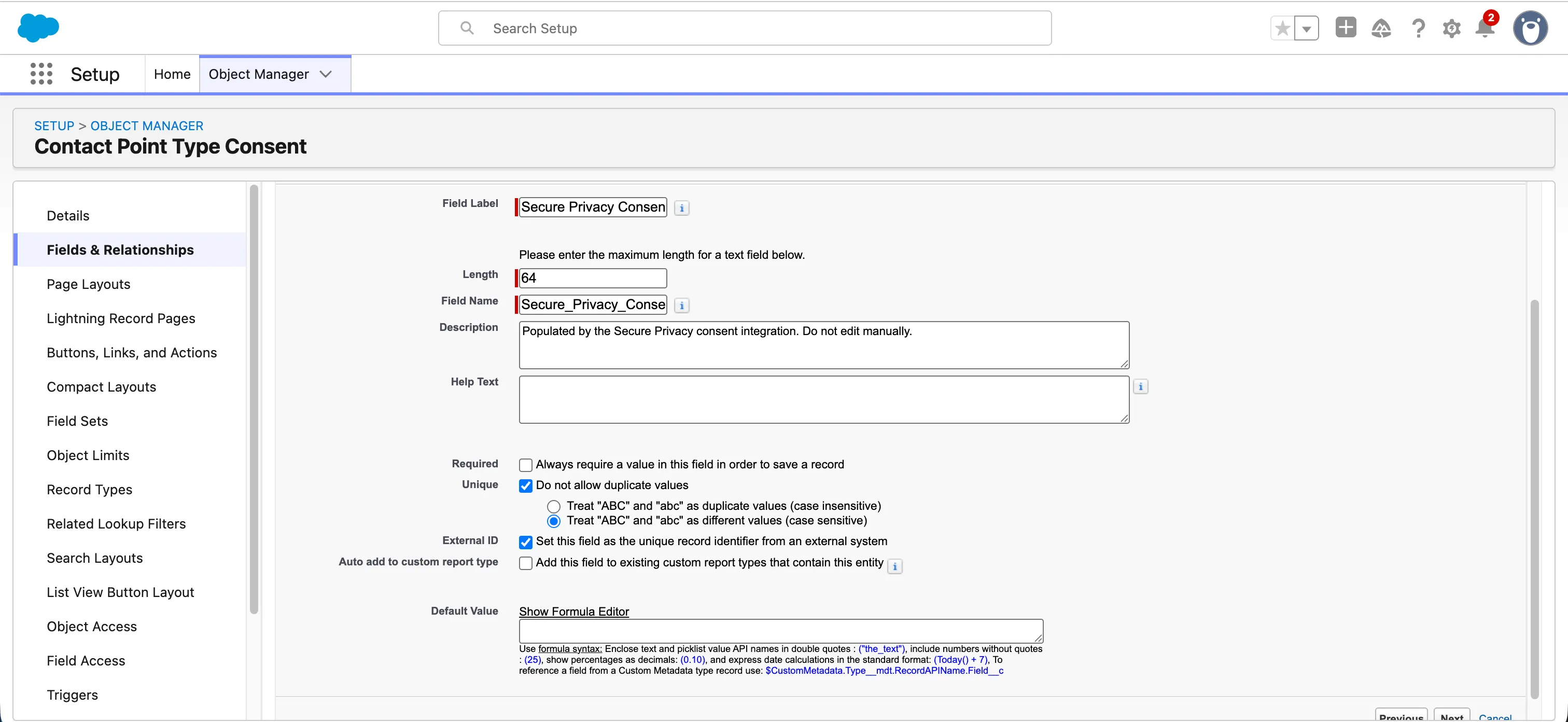
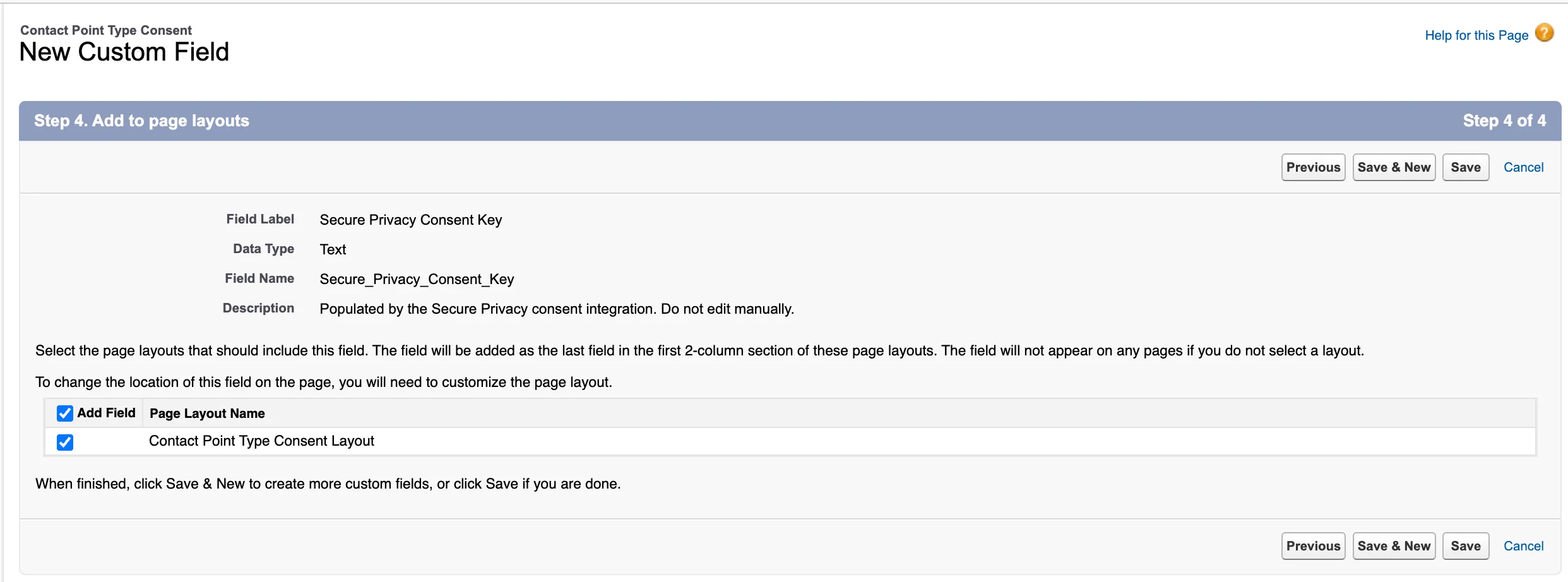
Section titled “Custom fields”Add two custom fields. Mark both as External ID and Unique. This is what lets the sync run over and over without creating duplicate records: Salesforce matches on the ID you supply and updates the existing record instead of adding another one.
| Object | Label | API name | Type |
|---|---|---|---|
Individual |
Secure Privacy Subject ID | Secure_Privacy_Subject_Id__c |
Text(128) |
ContactPointTypeConsent |
Secure Privacy Consent Key | Secure_Privacy_Consent_Key__c |
Text(64) |
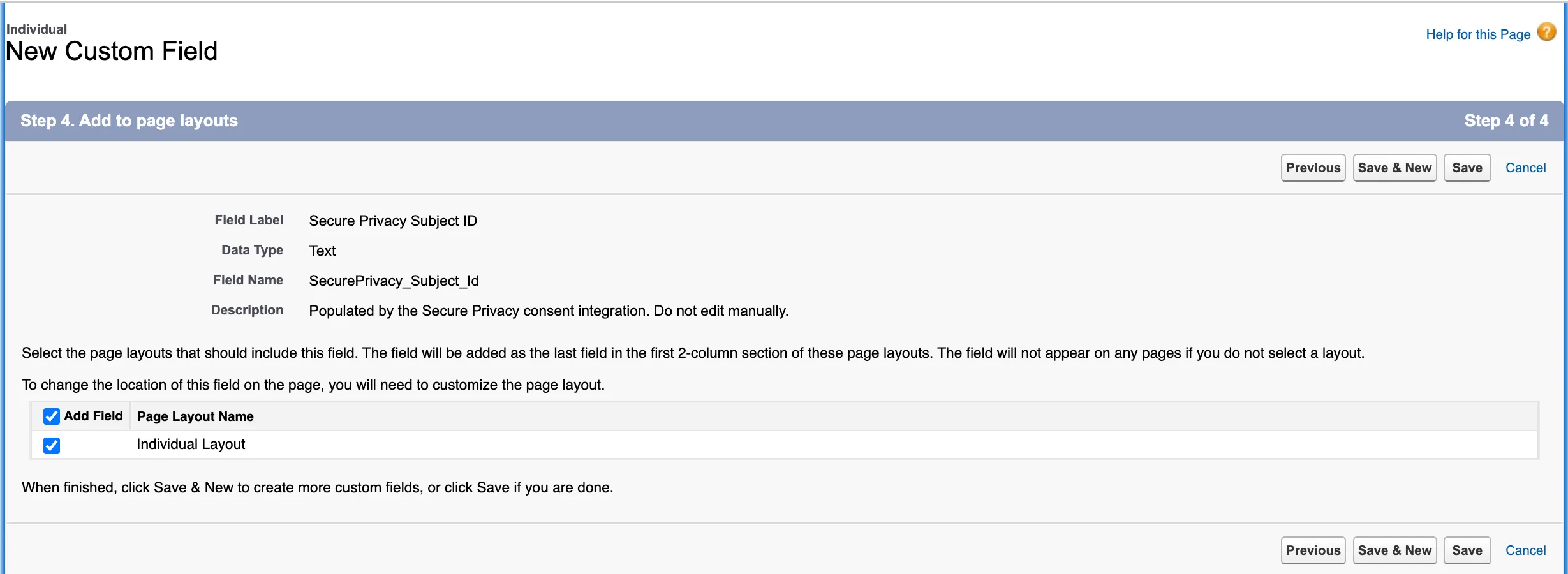
On Individual, create Secure Privacy Subject ID as Text(128):
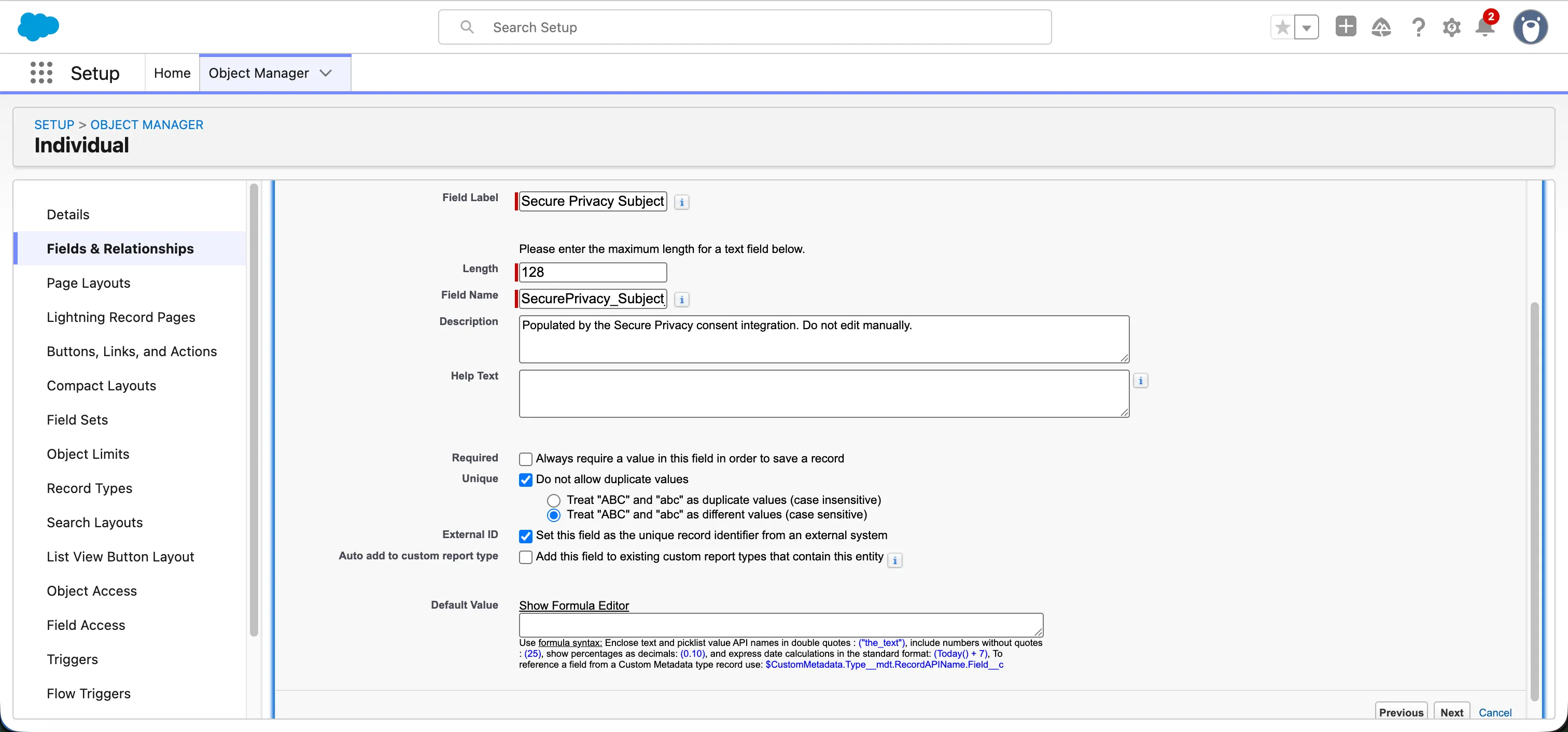
At step 4 of the wizard, add it to the Individual layout so you can check values by eye during testing:
Then repeat on ContactPointTypeConsent for Secure Privacy Consent Key as Text(64) — same Unique and External ID settings:
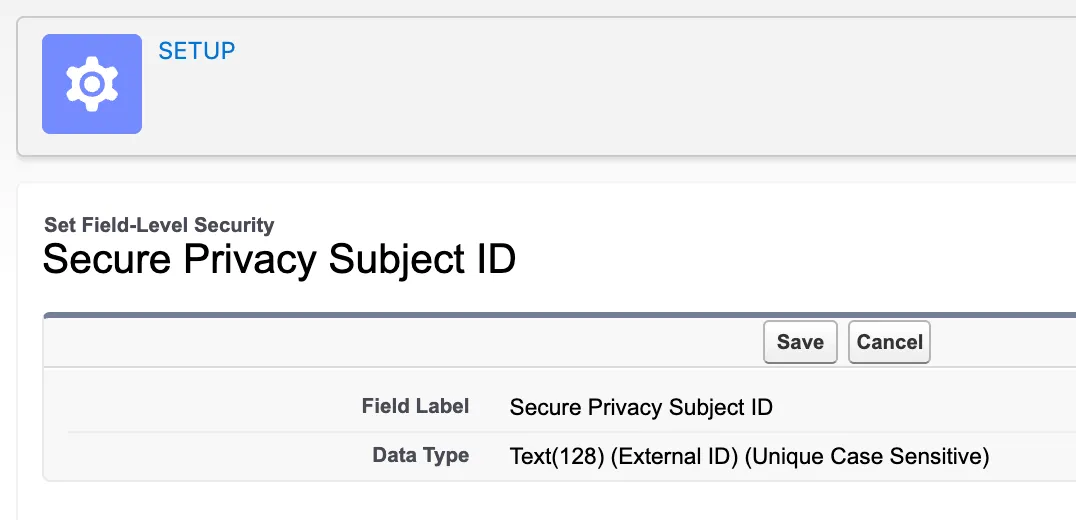
After saving, confirm the field reports all three properties — the length, External ID, and Unique Case Sensitive:
Access
Section titled “Access”Create a dedicated integration user with a permission set granting read/create/edit on the consent objects, read on Contact and Lead, API Enabled, and no delete.
Grant field-level security on both custom fields. Missing field-level security is the most common cause of “no such column” errors — the field exists, the API just cannot see it. In the permission set, go to Object Settings → Individual → Field Permissions and tick Read and Edit for Secure Privacy Subject ID. Repeat on Contact Point Type Consent for the consent key.
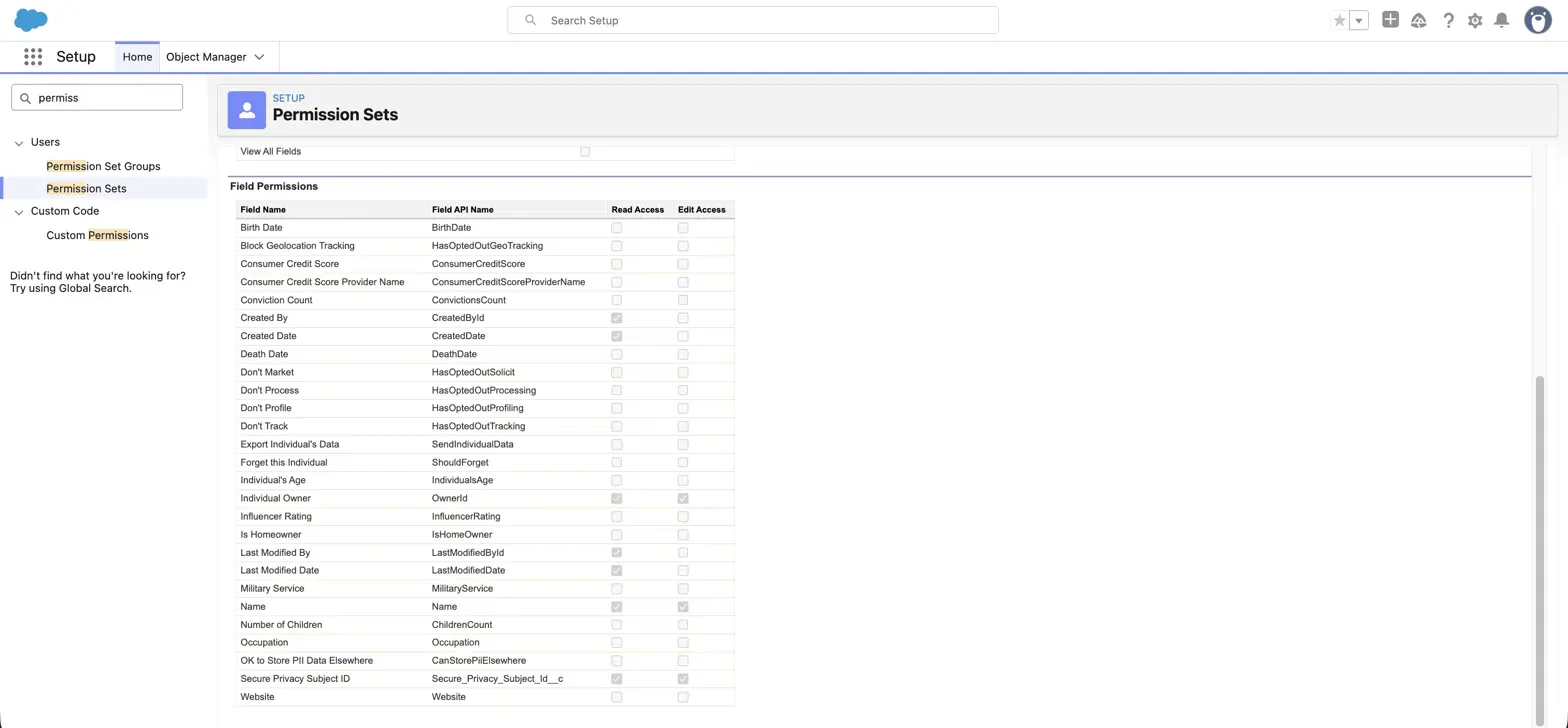
Turn on field history tracking for PrivacyConsentStatus. Free audit trail.
2. Authentication
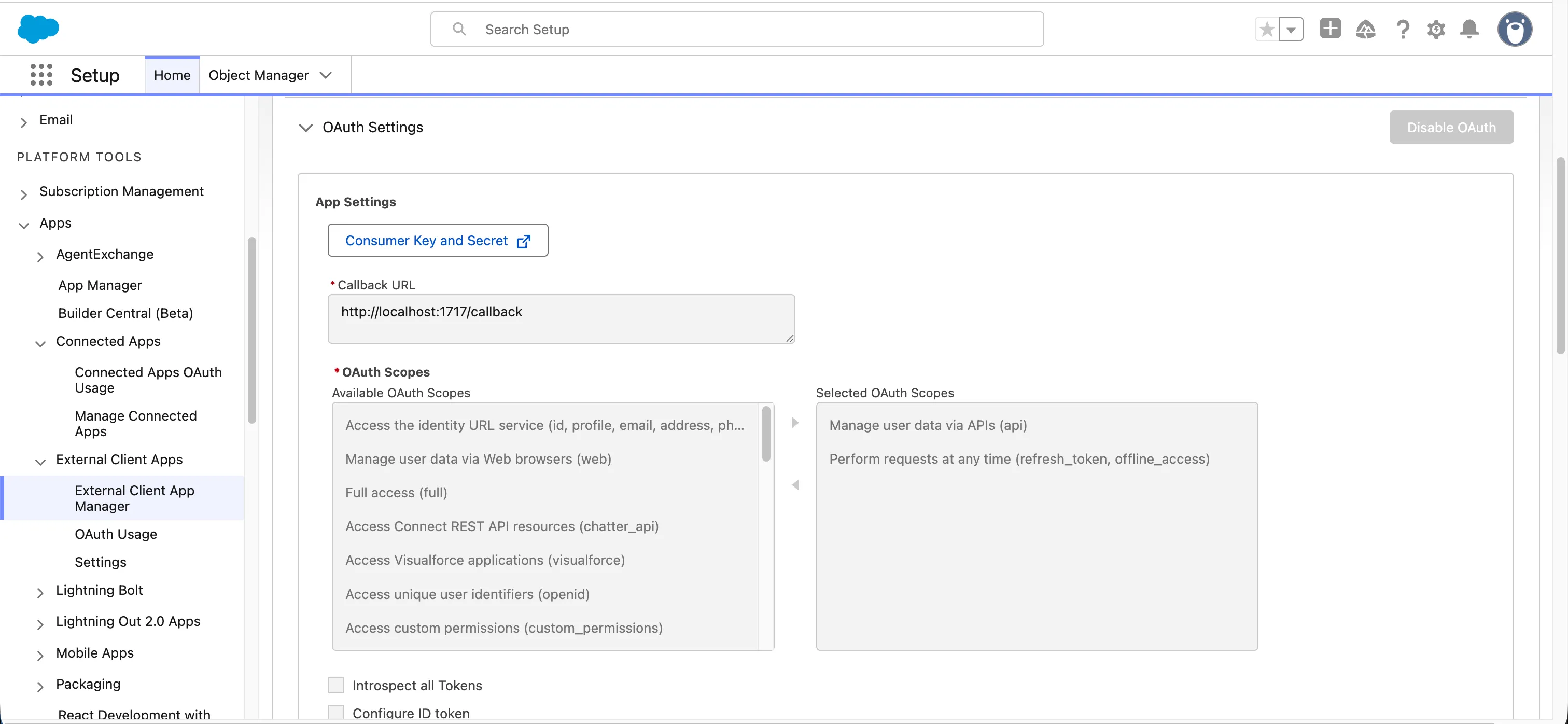
Section titled “2. Authentication”Use JWT bearer. Generate a key pair, then create an External Client App: App Manager → New External Client App. Enable OAuth, set a callback URL (unused by this flow, but the form requires one), and select the scopes api and refresh_token offline_access.
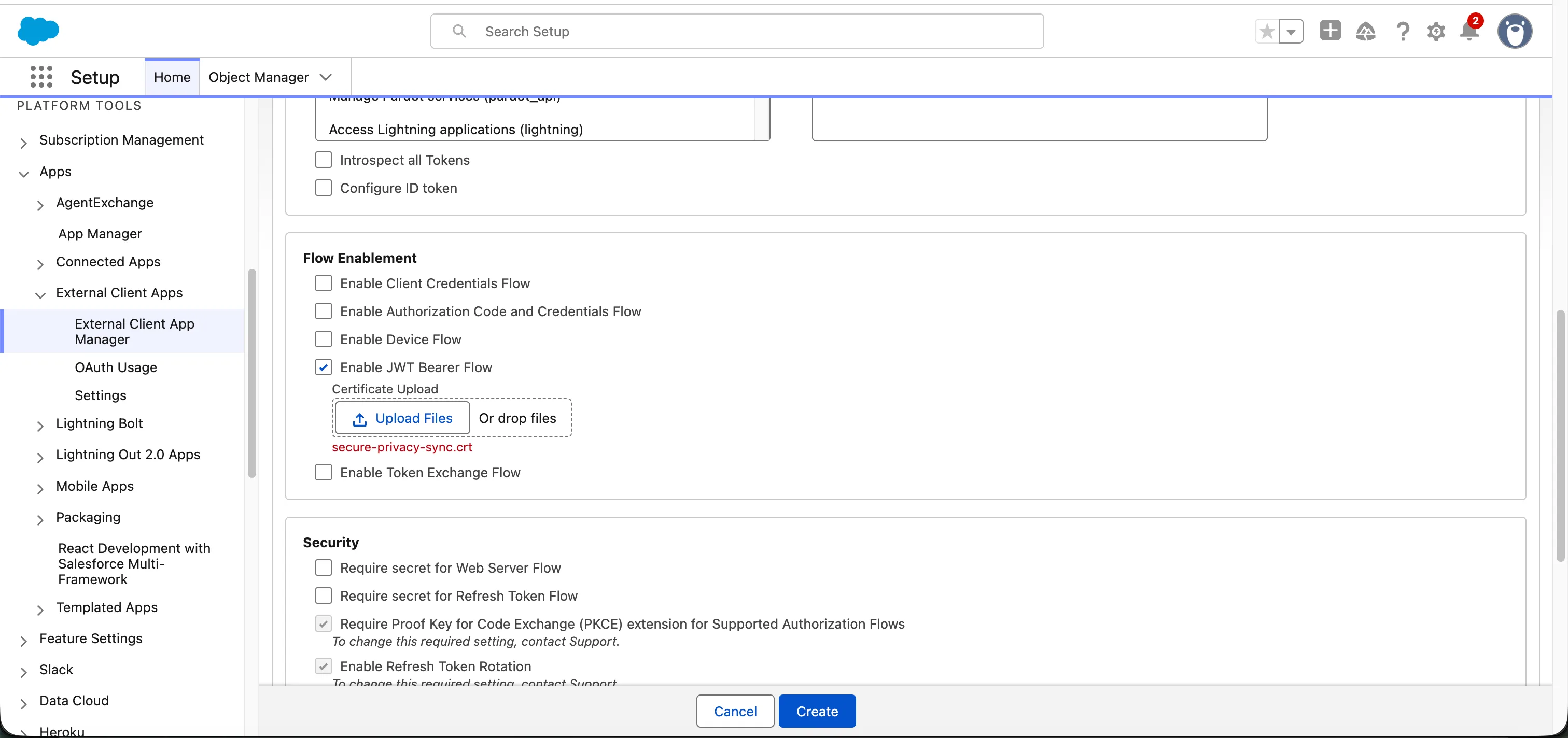
Further down the same form, under Flow Enablement, tick Enable JWT Bearer Flow — that is what reveals the certificate upload. Keep the private key in a secret manager, and note the certificate expiry: an expired signing certificate is a silent, total outage.
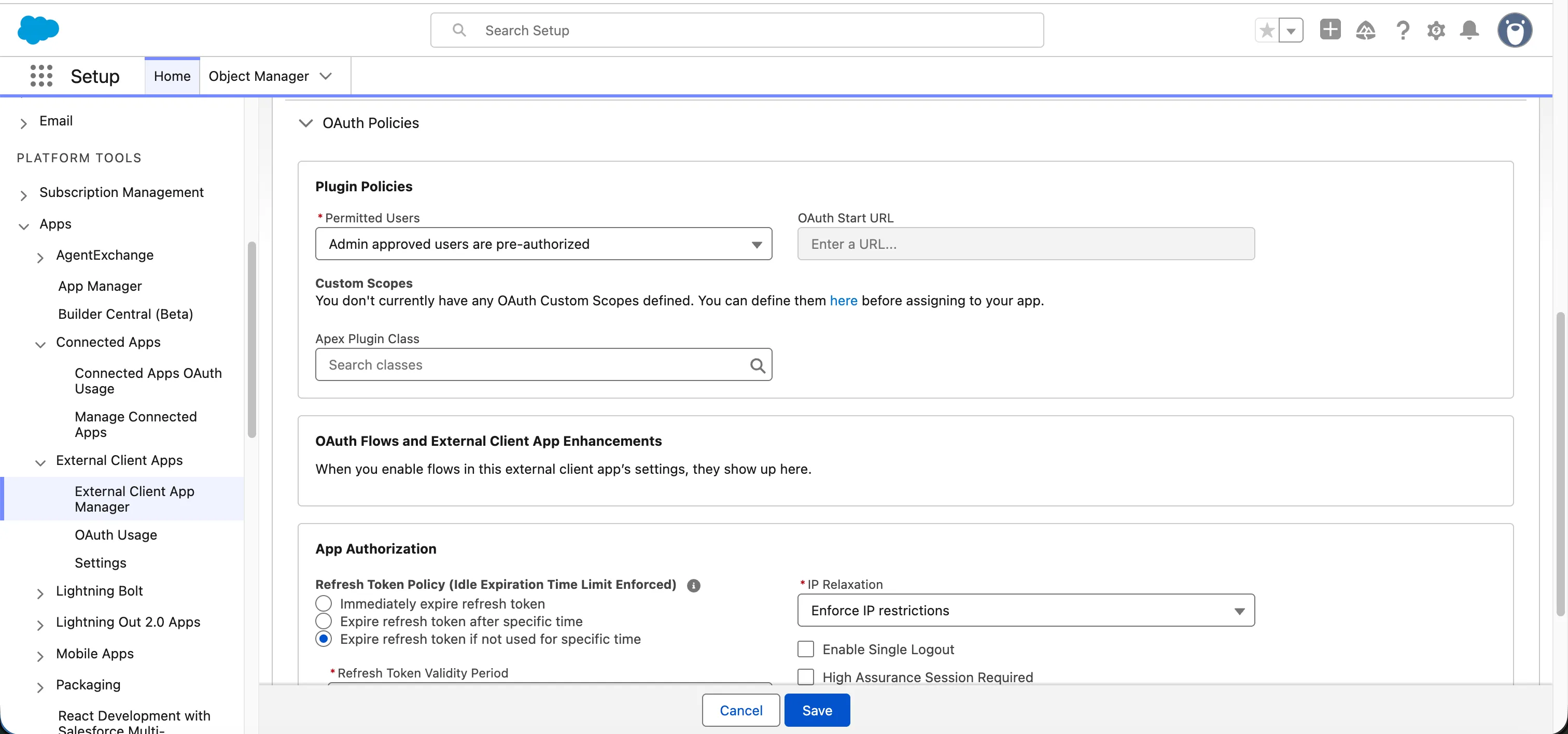
After saving, set Permitted Users to Admin approved users are pre-authorised under Policies → OAuth Policies, then assign the integration user’s permission set to the app. Missing this step produces a bare invalid_grant with no useful detail, and it is the most common reason a correctly configured certificate still fails.
// Token acquisition + refresh. Cache it, but refresh on expiry -- a one-way// isConnected flag means every call fails after the session times out until// someone restarts the process.let cached: { token: string; instanceUrl: string; at: number } | null = null;const REFRESH_AFTER_MS = 20 * 60 * 1000;
async function getConnection(force = false): Promise<Connection> {  if (force || !cached || Date.now() - cached.at > REFRESH_AFTER_MS) {    const assertion = jwt.sign(      {        iss: config.clientId,        sub: config.integrationUsername,        aud: config.loginUrl,          // test.salesforce.com for sandboxes        exp: Math.floor(Date.now() / 1000) + 180,      },      config.privateKey,      { algorithm: 'RS256' },    );
    const res = await fetch(`${config.loginUrl}/services/oauth2/token`, {      method: 'POST',      headers: { 'Content-Type': 'application/x-www-form-urlencoded' },      body: new URLSearchParams({        grant_type: 'urn:ietf:params:oauth:grant-type:jwt-bearer',        assertion,      }),    });    if (!res.ok) throw new Error(`JWT exchange failed: ${res.status}`);
    const data = await res.json();    cached = { token: data.access_token, instanceUrl: data.instance_url, at: Date.now() };  }
  return new Connection({    instanceUrl: cached.instanceUrl,    accessToken: cached.token,    version: '67.0',  });}
// Retry once on session expiry.async function withSession<T>(fn: (c: Connection) => Promise<T>): Promise<T> {  try {    return await fn(await getConnection());  } catch (e: any) {    if (e?.errorCode !== 'INVALID_SESSION_ID') throw e;    return fn(await getConnection(true));  }}
Verify the whole chain before writing any integration code — sf org login jwt with the same certificate, client ID and username will succeed only if the certificate, the flow toggle and the permitted-users policy are all correct together.
Client credentials is a valid simpler alternative — enable it on the app, set Run As to the integration user, swap grant_type for client_credentials with client_id/secret. Everything downstream is identical. The trade-off is a long-lived secret instead of a certificate.
Use jsforce v3 (import { Connection } from 'jsforce' — no default export) and don’t install @types/jsforce; v3 ships its own types and the two conflict.
3. Reference data
Section titled “3. Reference data”The write step needs the Salesforce ID of a DataUsePurpose for every category it maps. Purposes change roughly never, so look them up once per run and cache them rather than querying per record.
// Purpose name -> Salesforce Id. Populated on first use, held for the// lifetime of the process.const purposeCache = new Map<string, string>();
async function getPurposeId(name: string): Promise<string> {  const hit = purposeCache.get(name);  if (hit) return hit;
  const id = await withSession(async (conn) => {    const rows = await conn      .sobject('DataUsePurpose')      .find({ Name: name }, ['Id'])      .limit(1)      .execute();
    // A missing purpose is a setup error, not a data error. Failing here    // is much easier to diagnose than writing consents against a null    // lookup and wondering later why they are unreportable.    if (rows.length === 0) {      throw new Error(        `DataUsePurpose '${name}' not found. Create it (section 1) before running.`,      );    }    return rows[0].Id as string;  });
  purposeCache.set(name, id);  return id;}
4. Pulling consent from Secure Privacy
Section titled “4. Pulling consent from Secure Privacy”Auth. API key as a Bearer token — Account → API Integrations in the platform. Base URL https://api-prod.secureprivacy.ai.
Endpoint. GET /api/consents, query params only. DomainId is required; a wrong one returns 403. FromDate / ToDate filter on LastUpdated, which is what makes withdrawals show up in a run that only asks for recent changes.
Send Accept: application/json. The endpoint content-negotiates. Without that header a perfectly valid, authenticated request returns HTTP 200 with an HTML debug page rather than JSON — so the status check passes and the parse fails somewhere confusing. An unauthenticated request can also redirect to /api/login instead of returning 401, so set redirect: 'manual' and treat any 3xx as an auth failure.
Response shape
Section titled “Response shape”The fields that are always present, and the ones that are not:
| Field | Presence | Note |
|---|---|---|
ConsentId |
Always | Note the name — there is no Id field |
ClientId, DomainId, PageUrl, Status |
Always | ClientId is opaque — do not assume hex |
Created, LastUpdated |
Always | /Date(…)/, not ISO 8601 |
Categories, Device |
Always | |
Expiration |
Optional | Set by the domain’s retention period |
BrowserSignals |
Optional | Absent when no signal was set — see below |
CustomUserId |
Optional | Absent entirely on an anonymous banner — see 5 |
Because BrowserSignals appears only when a signal was actually set, consent.BrowserSignals?.GPC is the correct expression for the GPC override — a missing object means “no signal”, which must read as “no override”, not as an error and not as an opt-out. Do not rewrite it to assume the object exists.
async function fetchWindow(from: string, to: string) {  const perPage = 1000;               // max; default is 100  let page = 1, total = Infinity;  const all: SpWebConsent[] = [];
  while (all.length < total) {    const url = new URL('https://api-prod.secureprivacy.ai/api/consents');    url.search = new URLSearchParams({      DomainId: config.domainId,       // required; wrong value returns 403      FromDate: from,      ToDate: to,      PageNumber: String(page),      ResultsPerPage: String(perPage),    }).toString();
    const res = await fetch(url, {      headers: {        Authorization: `Bearer ${config.apiKey}`,        Accept: 'application/json',    // required -- see above      },      redirect: 'manual',              // an unauthenticated call redirects    });
    if (res.status === 429) {      await sleep(Number(res.headers.get('Retry-After') ?? 60) * 1000);      continue;                        // retry the same page    }
    // Check the status before parsing. A 403 or an HTML error page would    // otherwise surface as a JSON syntax error several frames away from    // the actual cause.    if (res.status >= 300 && res.status < 400) {      throw new Error(`Not authenticated: redirected to ${res.headers.get('location')}`);    }    if (!res.ok) throw new Error(`Consent fetch failed: ${res.status}`);
    const body = await res.json();    // Errors can also arrive on a 200, so check the payload as well.    if (body.ResponseStatus) throw new Error(body.ResponseStatus.Message);
    total = body.TotalResultsCount;    all.push(...body.PagedResults);    page++;  }
  return all;}
Always ask for a fixed date range. Results come back newest first by LastUpdated, so if someone changes their consent while you are part-way through reading the pages, records shuffle position — and one can be read twice or skipped entirely. Setting both FromDate and ToDate freezes the set you are reading. A record read twice does no harm, because the second write just updates the first. A record skipped is the real problem.
Rate limits. 40 requests/second, 1200/minute, per domain. Direct API calls are never cached so every one counts. When you get a 429, wait for the period given in the Retry-After header rather than guessing.
The first run
Section titled “The first run”An incremental run reads minutes of change. The first run has no watermark and would try to read your entire history in one pass, which is a different problem in three ways.
Walk the backfill in slices. Loop the same fetchWindow over successive day or week ranges rather than asking for one enormous window, persisting the watermark after each slice. A failure then costs you one slice, not the whole load.
Watch the Salesforce side, not the Secure Privacy side. At 1000 records per page the read is cheap. The write is what consumes the org’s daily API allocation, and one consent can produce several rows. For anything past a few tens of thousands of rows, load through Bulk API 2.0 instead of the synchronous path in section 6, and agree the timing with your Salesforce admin beforehand — a backfill that exhausts the daily limit takes your other integrations down with it.
Expect low resolution rates on old data. Historic consents predate any linking your site now does, so most of the backfill will resolve to nothing. That is not a fault; count it and move on.
5. Matching consents to people
Section titled “5. Matching consents to people”The three identifiers
Section titled “The three identifiers”Three values do three different jobs, and conflating them is the most common source of confusion in this integration:
| Value | What it is | What it does |
|---|---|---|
ClientId |
Secure Privacy’s identifier for a browser. Always present. | Stored on Individual.Secure_Privacy_Subject_Id__c. The steady-state match key — once it is on the record, every later consent from that browser finds the person through it. |
CustomUserId |
Your identifier for a person — an email or Contact External ID. Optional, and absent unless the site sets it. | The bridge. It is how an anonymous browser gets connected to a CRM record the first time. Once that link is made it steps out of the way. |
Secure_Privacy_Consent_Key__c |
A value you calculate — neither system supplies it. | Names one decision row: one subject, one purpose. It is what makes a repeat run update rather than duplicate. It is not an identity and has nothing to do with CustomUserId. Whether “subject” means the person or the browser is a choice — see 6. Writing consent. |
Only the first two identify anybody. The consent key is bookkeeping — what it is built from is a decision, covered in 6. Writing consent.
Treat ClientId as an opaque string. Store it and compare it, but do not parse or validate its format — banner versions differ in how they generate it, and a regex check will reject identifiers that are perfectly valid. Text(128) is wide enough for any of them.
The ClientId lands on the Individual record, and that is what every subsequent consent from the same browser matches against:
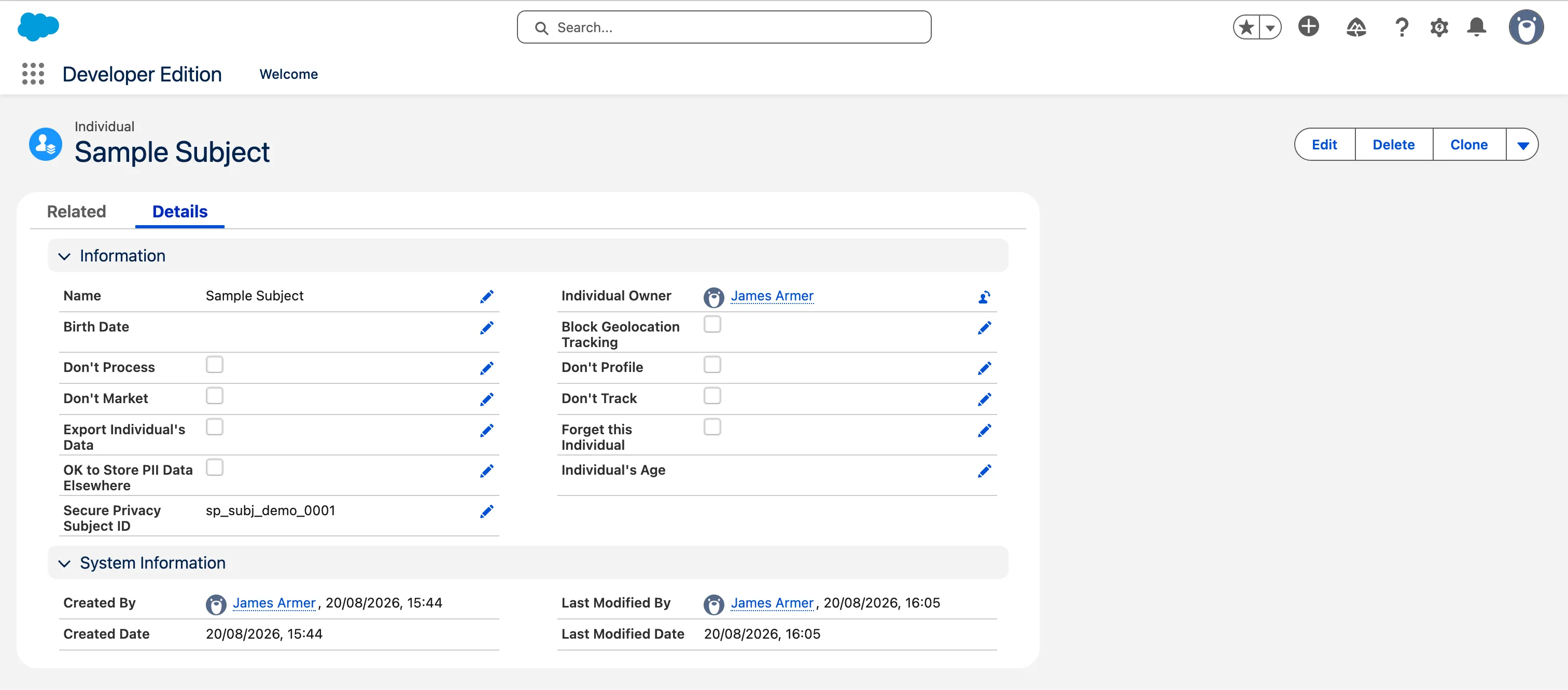
CustomUserId is the whole ballgame. A cookie banner fires for anonymous visitors, so a consent record carries no CustomUserId unless the site has explicitly linked one — and where it is absent, the field does not appear in the payload at all. With no CustomUserId there is nothing to join on and no CRM counterpart to write to.
Measure this before you build. Pull a week of your real consents and count how many carry a CustomUserId. If the answer is near zero, the first piece of work is not the sync — it is making your site call the linking endpoint below.
Linking a browser to a person
Section titled “Linking a browser to a person”This is the call that closes the gap. PATCH /api/consent/customuserid/{clientId} attaches an identifier to the consents Secure Privacy holds for that browser, which makes them joinable to a CRM record from that point on.
// Attach an identifier to the consents held for this browser.async function assignCustomUserId(clientId, email) {  // The stored value is opaque and every later join has to reproduce it  // exactly, so normalise here -- otherwise [email protected] and  // [email protected] become two identities for one person.  const customUserId = email.trim().toLowerCase();
  const res = await fetch(    `${BASE_URL}/api/consent/customuserid/${encodeURIComponent(clientId)}`,    {      method: 'PATCH',      headers: {        Authorization: `Bearer ${config.apiKey}`,        'Content-Type': 'application/json',        Accept: 'application/json',      },      body: JSON.stringify({ DomainId: config.domainId, CustomUserId: customUserId }),      redirect: 'manual',    },  );
  const body = await res.json();
  // The identifier comes back on the response, so confirm it applied.  if (body.CustomUserId !== customUserId) {    throw new Error(`Failed to link ${clientId}`);  }
  return body;}
The response is not the GET /api/consents shape. It returns Consents rather than Categories, with ComplianceType / ComplianceTypeID instead of Category / CategoryId, and PageURL rather than PageUrl. PluginPreferences is a JSON-encoded string, not an array. Do not feed this response into the same parser you use for the read path — take the confirmation and re-read through GET /api/consents if you need the canonical record.
Once linked, the identifier is readable on the normal endpoint and is filterable: GET /api/consents?DomainId=…&[email protected] returns just that person’s records, which is a convenient way to prove the link landed.
Use an email or a Contact External ID — something that already exists in Salesforce. Never a raw Salesforce record ID: those differ between sandbox and production and the mapping breaks on the first org migration.
Resolution order
Section titled “Resolution order”Resolve in order, stopping at the first hit:
- Subject ID match on
Secure_Privacy_Subject_Id__c=ClientId. Once linking is in place this becomes the common path — but note it can only ever fire for a browser that step 2 has already resolved once, so on a domain that has just adopted the linking call it starts at zero and grows. CustomUserIdagainst a Salesforce External ID or email. One clear match → write theClientIdonto thatIndividualso future records match on step 1. Two or more matches → do not guess, fall through to step 4.- No
CustomUserId→ skip silently. An anonymous banner consent has no CRM counterpart; this is expected, not an error. Count them so you can show the ratio. - Unresolved queue — has a
CustomUserIdbut no match, or more than one.
Never match on name. A false positive applies one person’s privacy decision to someone else.
// Distinguishes "no identifier, nothing to do" from "had an identifier and// we could not place it". The first is normal; the second needs a human.const SKIP_ANONYMOUS = Symbol('anonymous');
async function resolveIndividualId(  consent: SpWebConsent,): Promise<string | typeof SKIP_ANONYMOUS | null> {  return withSession(async (conn) => {    // --- 1. Seen this browser before -------------------------------------    const direct = await conn      .sobject('Individual')      .find({ Secure_Privacy_Subject_Id__c: consent.ClientId }, ['Id'])      .limit(1)      .execute();
    if (direct.length === 1) return direct[0].Id as string;
    // --- 2. Identified visitor -------------------------------------------    // Normalise the same way the site does when it calls the linking    // endpoint, or the two will not meet.    const customUserId = consent.CustomUserId?.trim().toLowerCase();
    // --- 3. Anonymous ----------------------------------------------------    if (!customUserId) return SKIP_ANONYMOUS;
    // limit(2) is deliberate: enough to detect ambiguity, no more.    const contacts = await conn      .sobject('Contact')      .find({ Email: customUserId }, ['Id', 'IndividualId'])      .limit(2)      .execute();
    if (contacts.length > 1) {      await queueUnresolved(consent, 'ambiguous_email_match');      return null;    }
    if (contacts.length === 0) {      await queueUnresolved(consent, 'no_matching_contact');      return null;    }
    const individualId = contacts[0].IndividualId as string | null;
    if (!individualId) {      // The person exists in the CRM but has no Individual record, so      // there is nowhere to hang consent. Creating one means writing to      // Contact, which is beyond this integration's permission set and      // is your data model decision to make.      await queueUnresolved(consent, 'contact_has_no_individual');      return null;    }
    // Stamp the browser ID so this person takes step 1 from now on.    await conn.sobject('Individual').update({      Id: individualId,      Secure_Privacy_Subject_Id__c: consent.ClientId,    });
    return individualId;  });}
Salesforce IDs differ between orgs, so never write raw record IDs back into Secure Privacy — the mapping breaks when you move from sandbox to production. Use the 18-character form throughout; mixing it with the case-sensitive 15-character form causes intermittent match failures.
The unresolved queue is a compliance control, not a place to dump failures and forget them. Store the record with its original Created timestamp, monitor how many are waiting and how old the oldest is, and make it possible to re-run them later — using that original date, not the date you re-ran it.
6. Writing consent
Section titled “6. Writing consent”A web consent record has a top-level Status (Accepted / Declined / Partial) and a Categories array, each with a CategoryId, a Category name, and a boolean ConsentGiven.
Category IDs and why the display name is useless
Section titled “Category IDs and why the display name is useless”Read from a live domain, the categories look like this. CategoryId is a short numeric string, stable per domain:
CategoryId |
Display names observed | Suggested treatment |
|---|---|---|
11 |
Advertising |
Map → Marketing |
13 |
Analytics |
Map → Analytics |
14 |
Customer Interaction, Functional |
Map → Personalisation |
17 |
Essential |
Explicitly ignore — strictly necessary, consent not required |
20 |
Unclassified |
Explicitly ignore until classified — do not guess a purpose |
One CategoryId carries many display names. Category 14 above arrives as both Customer Interaction and Functional in the same dataset — and every category also arrives under a translated name whenever the banner renders in another language. The name follows the visitor’s locale and is editable in the banner config. Map on CategoryId and treat Category as a human-readable label only. A map keyed on the display name will silently stop matching the first time a visitor sees the banner in another language, or an admin renames a category.
Decide about Essential and Unclassified deliberately. Strictly necessary cookies do not rest on consent, so writing an OptIn for them records a decision the visitor was never offered. Unclassified has no known purpose to map to. Both belong in an explicit ignore list rather than a mapping — and crucially, ignoring them is a stated decision in code, not a silent default.
What the consent key is built from
Section titled “What the consent key is built from”The consent key has one job: name a single decision row, so that sending the same consent twice updates what is there instead of adding a duplicate. It is not an identity, and it is not CustomUserId — it is a value you calculate, and what you calculate it from is a decision to make before the first run.
| Built from | Gives you | Trade-off |
|---|---|---|
IndividualId + CategoryId |
One row per person per purpose | Matches what ContactPointTypeConsent means — a person’s decision about a channel. All of that person’s browsers collapse into one row and the most recent decision wins. But the key is derived from a Salesforce record ID, so it does not survive a move between orgs. |
ClientId + CategoryId |
One row per browser per purpose | Both values come from Secure Privacy, so the key is stable across orgs and survives sandbox → production. But one person on a laptop and a phone appears as two rows, which reads oddly in an object that is about a person. |
The sample below uses IndividualId, on the grounds that the object is about people rather than devices. Whichever you choose, calculate it the same way every time — that reproducibility is the entire mechanism — and build Name from the same inputs, so the label does not churn every time a different browser reports in.
// Verified against the org picklist, which also offers Email, Phone,// Social, MailingAddress, InPerson and Video. Confirm yours before coding.const CONTACT_POINT_TYPE = 'Web';
// CATEGORY_MAP: SP CategoryId -> Salesforce DataUsePurpose name.// Keep in config so a new banner category doesn't need a release.const CATEGORY_MAP: Record<string, string> = {  '11': 'Marketing',  '13': 'Analytics',  '14': 'Personalisation',};
// Categories deliberately NOT synced. Being explicit is the point: an// unlisted category throws rather than being dropped quietly.const IGNORED_CATEGORIES = new Set([  '17',   // Essential -- strictly necessary, consent not required  '20',   // Unclassified -- no known purpose; classify it first]);
// Timestamps arrive as /Date(1787663774128)/, not ISO 8601.const parseSpDate = (value?: string): string | undefined => {  const ms = /^\/Date\((-?\d+)/.exec(value ?? '');  return ms ? new Date(Number(ms[1])).toISOString() : undefined;};
// Names one decision row: this subject, this purpose. Same inputs always// produce the same key, so a repeat send updates rather than duplicates.// See "What the consent key is built from" above before changing this.const consentKey = (subjectId: string, categoryId: string) =>  crypto.createHash('sha256')    .update(`${subjectId}|${categoryId}`)    .digest('hex').slice(0, 64);
// individualId comes from resolveIndividualId (section 5) via the main// loop, so this function does one job and can be tested on its own.async function applyConsent(consent: SpWebConsent, individualId: string) {  // The decision time, NOT now(). Fail the record rather than guess.  const captured = parseSpDate(consent.Created);  if (!captured) throw new Error(`Unparseable Created: ${consent.Created}`);
  const records = [];
  for (const cat of consent.Categories) {    if (IGNORED_CATEGORIES.has(cat.CategoryId)) continue;
    const purposeName = CATEGORY_MAP[cat.CategoryId];    // Never fall back to a default -- silently dropping a purpose is    // worse than failing the run.    if (!purposeName) throw new Error(`Unmapped CategoryId: ${cat.CategoryId}`);
    // GPC is a legally recognised opt-out in several US states, so it    // overrides the category decision. BrowserSignals may be absent;    // optional chaining treats "no signal" as "no override".    const optedIn = cat.ConsentGiven && !consent.BrowserSignals?.GPC;
    records.push({      // Name is required. Built from the same inputs as the key, so the      // row's label stays put instead of flipping between browsers.      Name: `${individualId} ${purposeName}`,      Secure_Privacy_Consent_Key__c: consentKey(individualId, cat.CategoryId),      PartyId: individualId,      ContactPointType: CONTACT_POINT_TYPE,      DataUsePurposeId: await getPurposeId(purposeName),   // section 3      PrivacyConsentStatus: optedIn ? 'OptIn' : 'OptOut',      CaptureDate: captured,              // parsed from Created, NOT now()      EffectiveFrom: captured,            // note: EffectiveFrom, not ...Date      CaptureSource: consent.PageUrl,    });  }
  // upsert = create if the key is new, update it if the key already  // exists. 200 records per call is the Salesforce limit.  for (let i = 0; i < records.length; i += 200) {    await withSession(async (conn) => {      const results = await conn.sobject('ContactPointTypeConsent')        .upsert(records.slice(i, i + 200), 'Secure_Privacy_Consent_Key__c');
// A batch upsert reports per record. Without this check a rejected // row returns quietly, the main loop counts it as written, and the // watermark moves past a consent that never reached Salesforce. const failed = (Array.isArray(results) ? results : [results]) .filter((r) => !r.success); if (failed.length) { throw new Error(`${failed.length} of ${records.length} upserts failed`); } }); }}CaptureDate must come from Created on the consent record, not new Date(). Get this wrong and the audit trail records when the sync job ran rather than when the person actually decided, which is worthless in a regulatory response.
A finished record looks like this — note that Capture Date and Effective From carry the original decision time, not the time the sync ran:
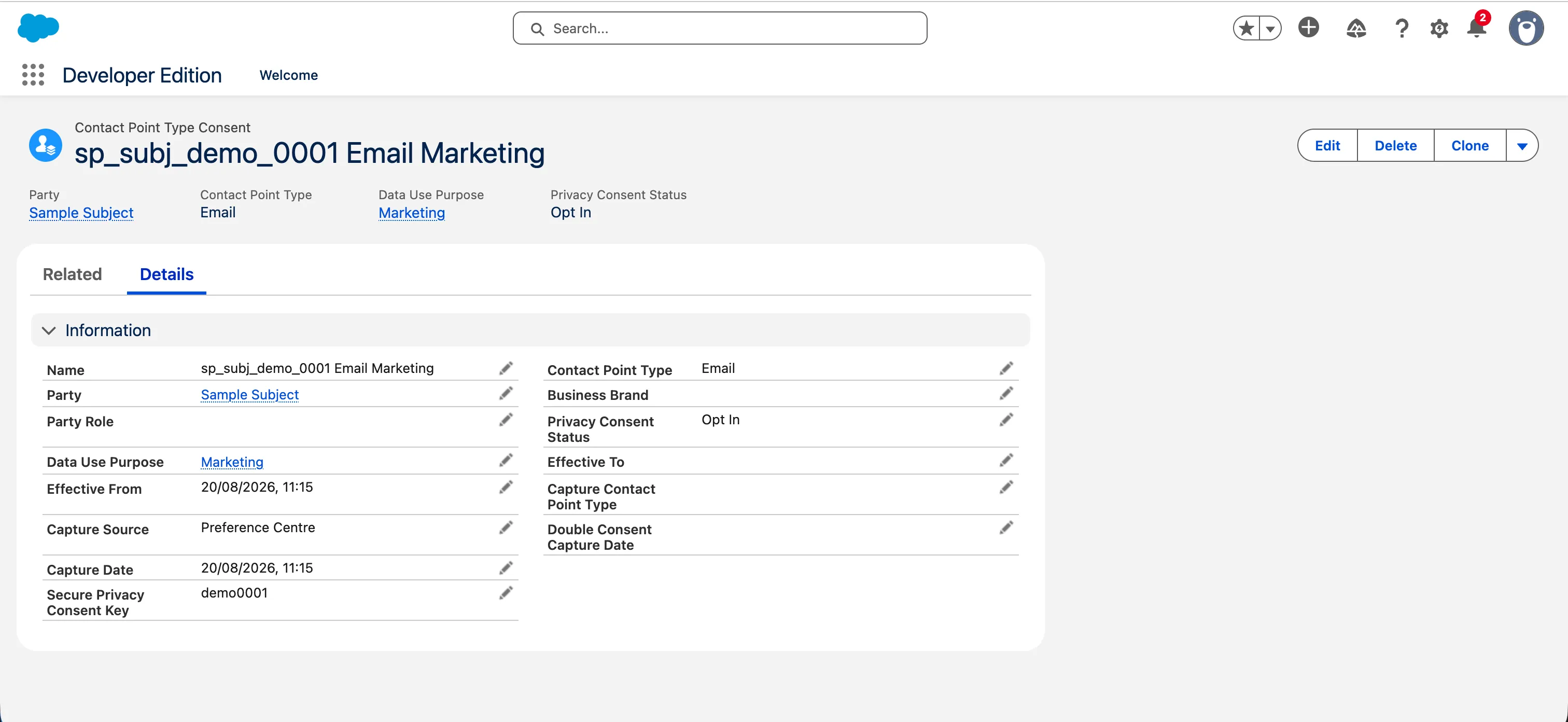
Withdrawals need no special handling — same key, the yes/no flips, and the existing record is updated in place. Test it deliberately anyway: it is easy to build something that syncs acceptances perfectly and never passes on a withdrawal, and the failure is invisible until someone asks. Same for Declined — if you only forward positive consent you have no record that anyone said no.
Choosing the ContactPointType
Section titled “Choosing the ContactPointType”Use Web. On a Summer ’26 org the ContactPointType picklist offers Email, Phone, Web, Social, MailingAddress, InPerson and Video. Web is the only value that describes the channel a cookie banner consent was actually captured on, and it keeps these records visibly distinct from preference-centre consent to be emailed or called. Confirm the list against your own org before coding — it varies by API version and enabled features.
Expiration tells you when Secure Privacy will delete the record under the domain’s retention period. It is optional and often absent. Salesforce will not delete its copy at the same time either way, so agree whose retention policy governs the Salesforce side.
7. Gotchas
Section titled “7. Gotchas”| Symptom | Cause |
|---|---|
invalid_grant on JWT exchange |
User not pre-authorised on the app, cert/key mismatch, aud pointing at login.salesforce.com for a sandbox, or clock skew |
Username-Password Flow Disabled |
Something still on the retired flow — see 2. Authentication |
No such column 'Secure_Privacy_Subject_Id__c' |
Field-level security, not a missing field. Check that first, then check the API name matches exactly |
INVALID_SESSION_ID repeating |
Session refresh not wired up |
REQUEST_LIMIT_EXCEEDED |
Org daily allocation exhausted, often by a backfill. Check Setup → System Overview |
HTML where JSON was expected, on a 200 |
Missing Accept: application/json. The service content-negotiates and will happily serve you a debug page |
Redirect to /api/login |
Request was not authenticated. This endpoint can redirect rather than return 401, so set redirect: 'manual' |
200 with a ResponseStatus body and no PagedResults |
An API error reported inside a success status — e.g. ApiKey does not exist. Check the envelope, not just the status |
| Consents counted as written but missing from Salesforce | Batch upsert results not inspected. A rejected row returns quietly unless you check success on each result |
| Salesforce datetime fields full of nonsense | Created written through unparsed. It is /Date(1787663774128)/, not ISO 8601 |
| Some consents silently dropped | Code validating the format of ClientId. It is opaque — store what you are given |
| Whole consent history duplicates after an org move | Consent key built from IndividualId, which changes between orgs — see 6. Writing consent |
| One person appears under two identities | CustomUserId written with inconsistent casing. Normalise the email on both the linking call and the match |
| Everything resolves to anonymous | The site is not calling the linking endpoint. Measure coverage before assuming the sync is broken |
403 from /api/consents |
DomainId does not belong to the authenticated account |
429 from Secure Privacy |
40/second, 1200/minute per domain. Wait for the period in Retry-After |
| Consent records dated today | CaptureDate set to new Date() instead of the record’s Created |
| Category mapping stops matching some visitors | Mapped on the display name. It follows the visitor’s locale and is editable, so one CategoryId arrives under several names |
| Acceptances sync, withdrawals do not | Extract filtered by Status, or dates compared against Created rather than LastUpdated |
| Records read twice or missed part-way through a run | No fixed date range. Set both FromDate and ToDate |
| A failed record never retried | Watermark advanced despite failures in the pass. Hold it back — re-reading is safe |